Cost management & FinOps
Cloud Control's FinOps core: FOCUS-normalized spend by cloud, service and tag, an explicit untagged bucket, budgets with thresholds, and statistical anomaly detection — plus billing onboarding (Cost Explorer + the CUR export blueprint).
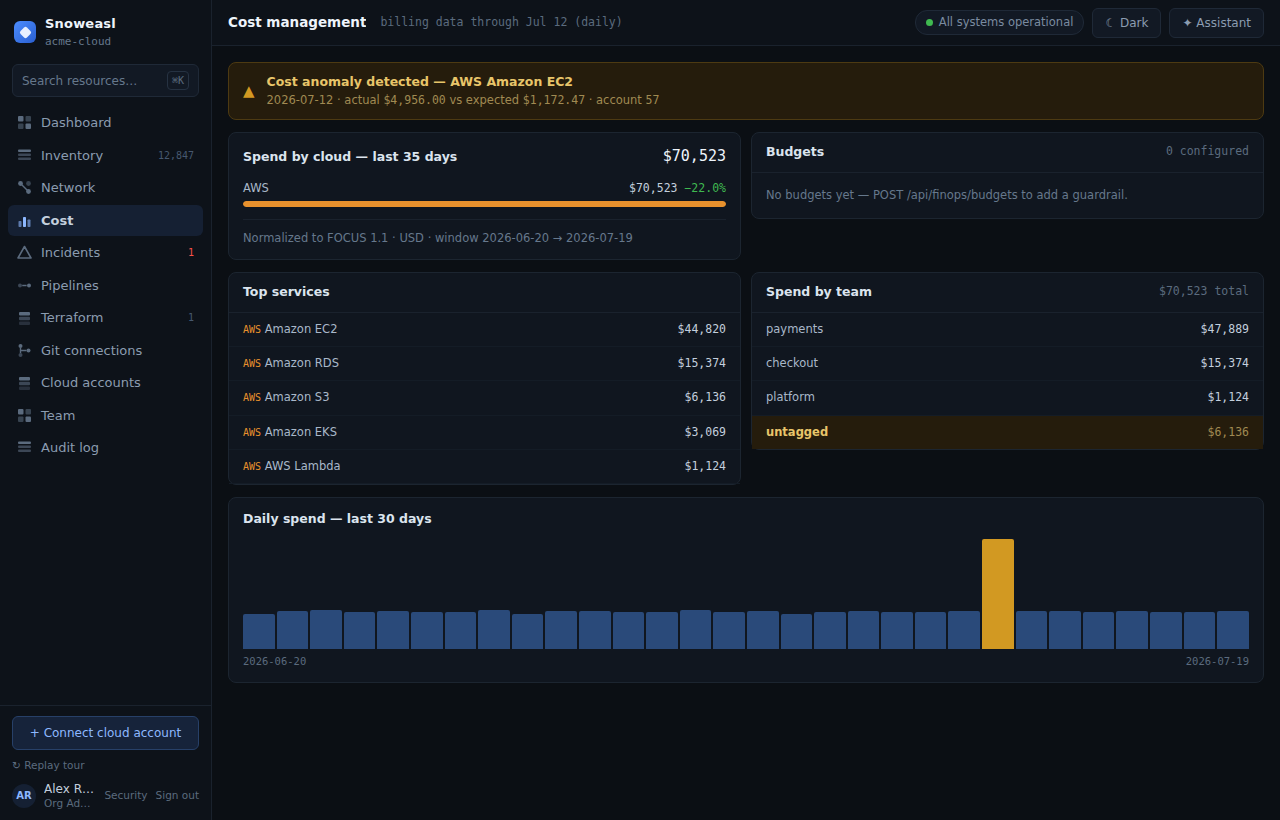
The Cost screen (/cost) is Cloud Control's FinOps core: native billing from each cloud is ingested and normalized to the FOCUS standard, then presented as one cross-cloud view with budgets and anomaly detection. The normalization reconciles to the source total to the cent.
What you get
- Spend by cloud — total normalized cost per provider.
- Spend by service — the top services driving cost.
- Spend by tag — cost grouped by team tag, with an explicit untagged bucket so nothing hides; the buckets sum to the cloud total.
- Daily trend — a daily spend series with anomalies highlighted.
- Budgets — evaluated against actual spend with an
ok/warn(threshold) /breachedstate. - Anomalies — statistically detected spikes with full attribution.
Billing onboarding — two paths (AWS)
Until cost is ingested, the Cost screen shows a step-by-step Billing setup guide with two paths. You start with the quick path and deepen with the CUR export whenever you need resource-level detail.
Quick path — Cost Explorer (live now)
- Grant the connector role the
ce:GetCostAndUsagepermission (add it to the CloudControlConnector role's read-only policy). Cost Explorer must be enabled once on the payer account. - Cloud Control ingests the last ~30 days on the next sync, or immediately when you Re-check the account from the Clouds screen.
- Aggregate spend by cloud, service and day — and any anomalies — appear on the Cost screen automatically.
This is the analysis source that is live today: the real AWS adapter calls the global Cost Explorer endpoint (ce.us-east-1.amazonaws.com, GetCostAndUsage, daily, grouped by service), SigV4-signed with the assumed connector role. If ce:GetCostAndUsage is missing or Cost Explorer is not enabled, ingestion records an honest empty state — no fabricated numbers — and the account stays healthy; the guide stays up until the permission lands. Cost Explorer's service grouping does not carry per-resource tags, so the untagged bucket holds the total on the quick path.
Deep path — CUR export blueprint (resource & tag detail)
- From the Terraform screen, deploy the AWS billing export (CUR → S3) blueprint (
aws/billing-cur). It provisions an S3 bucket, anaws_cur_report_definition(Parquet, hourly, withRESOURCESandSPLIT_COST_ALLOCATION_DATA), and the bucket policy that lets the AWS billing service write the export. The Cost screen's Deploy CUR export button opens Terraform with this blueprint preselected. - AWS starts writing the CUR export to S3 within about 24 hours; resource- and tag-level cost lands in the same cost views.
The CUR blueprint provisions the export today. The Parquet CUR reader — the piece that turns the S3 export into per-resource cost rows — is a documented follow-on. Cost Explorer (the quick path) is the live analysis source now.
Ingesting cost
A freshly connected organization gets cost automatically — the connect-kick ingests billing right after the first healthy connection. You can also trigger ingestion on demand with `POST /api/finops/ingest` (requires manage_cloud_accounts). Once cost exists, the Cost section cuts over from empty to real and `GET /api/finops/cost` returns the full payload; before that it returns { empty: true }.
Budgets
Create budgets with `POST /api/finops/budgets` (requires mutate_infra; Viewers get a 403). A budget has a name, a monthly amount, a scope and a threshold. Its evaluated state rides the cost payload, so the Cost screen shows each budget as ok, warn at the threshold, or breached. Reads are open to all members; cross-organization budget ids return 404.
Anomaly detection
Anomalies are detected with a pure mean-plus-three-sigma test over the trailing 28 days, with baseline guards (enough history, a minimum mean, and a minimum multiple over the mean) so noise does not trip an alert. Each anomaly is attributed to a provider, service, account and day with the expected and actual amounts, persisted so it is audited exactly once (finops.anomaly_detected).
FOCUS normalization, spend breakdowns, budgets (alert state) and anomaly detection are real. A hard budget guardrail that blocks deploys, optimization recommendations, cross-cloud price comparison, chargeback export, cost RBAC scoping and multi-currency are on the roadmap.
Try it
Walk through Create a budget and catch a cost anomaly.